/search phrase/e
Thursday, August 23, 2007
VIM - Search to end of word
This will leave your cursor at the end of the searched phrase:
Monday, August 13, 2007
VIM - format lines to certain width
First,
:set textwidth=80 (or :set tw=80)
Then,
For more help,
:help gq
:set textwidth=80 (or :set tw=80)
Then,
| gqq | Format a single line |
| {Visual}gq | Format visual selection. (ctrl+v to get to visual mode then use hjkl to navigate) |
For more help,
:help gq
Sunday, August 5, 2007
Compile Pidgin for Ubuntu 7.04
Download source: http://www.pidgin.im/download/
Install dependencies:
For MSN and GoogleTalk:
Compile:
Install dependencies:
sudo apt-get install gettext libglib2-dev libgtk2.0-dev libxml2-devFor MSN and GoogleTalk:
sudo apt-get install libnss-dev libnspr-devCompile:
./configure
make
sudo make install
make install clean
Sunday, July 8, 2007
Mouse gestures
What is a mouse gesture?
They can probably be explained better with an example:Say you wanted to scroll down on a webpage using your mouse. Normally, you would point your mouse cursor to a scroll bar and clicking on it. Using mouse gestures, you would click and hold on to the right mouse button, move the mouse cursor down a little bit, and then let go of the button.
What are the advantages of mouse gestures?
First off, you don't need to point to any user interface element; thus, mouse gestures save time by minimizing mouse movement.Most mouse gesture programs allow you to customize what your mouse gestures do. For example, if you did not want the down gestures to scroll down, you can change it to do something else such as changing tabs.
How do I add mouse gestures?
For Windows: StrokeItFor Firefox: All-in-One Gestures
Other: wikipedia entry
Thursday, June 28, 2007
Friday, June 22, 2007
Excel - Custom page numbering
- View → Header and Footer...
- "Custom Header..." button
- Type these into any one of the sections:
Input Result for page 1 &[Page]+5& 6 -&[Page]+5- -6- [&[Page]+5] [6] (&[Page]+5) (6)
Wednesday, June 20, 2007
VIM - minibufexpl
Script: minibufexpl.vim
"MINIBUFEXPLORER Stuff (Enter "\mbe" minus quotes quickly to bring it up)
""Commands:
" Ctrl-PgDown - goto next buffer
" Ctrl-PgUp - goto prev buffer
" \-Backspace-= - toggle minibufexplorer
"let g:miniBufExplMaxSize = 3 "allow up to 3 lines of buffers
let g:miniBufExplModSelTarget=1
"mapmbo :MiniBufExplorer
noremap:bn
inoremap:bn
cnoremap:bn
noremap:bp
inoremap:bp
cnoremap:bp
noremap= :TMiniBufExplorer
noremapu :UMiniBufExplorer
set hid "Hide abandoned buffers in order to not loose undo history
Monday, June 18, 2007
KDE - Default browser
$ kcontrol
KDE Components → Default Applications → Web Browser
Under Default Component, choose "In the following browser"
Type in: firefox (or your browser of choice)
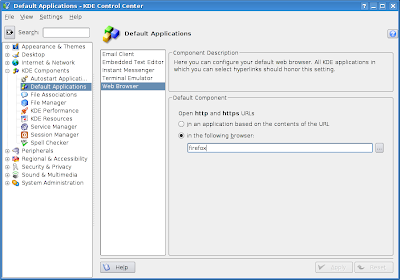
Then go to KDE Components → File Associations.
Go to Text → html.
Click Firefox and press the Move Up button.
KDE Components → Default Applications → Web Browser
Under Default Component, choose "In the following browser"
Type in: firefox (or your browser of choice)

Then go to KDE Components → File Associations.
Go to Text → html.
Click Firefox and press the Move Up button.
Wednesday, June 13, 2007
LINUX/UNIX - inputrc options
Add this to your ~/.inputrc to
# get default system bindings
$include /etc/inputrc
# ignore case on tab complete
set completion-ignore-case On
# prefer visual bell
set prefer-visible-bell
Tuesday, June 12, 2007
Perl - Find and replace all
Find cpp and hpp recursively from the current directory then append those files onto the perl command, which substitutes "old" for "new" in those files while creating .bak backups.
or non recursive:
find . -name "*.[ch]pp" -type f | xargs perl –i.bak –p –e 's/old/new/g;'or non recursive:
perl -pi -w -e 's/search/replace/g;' *.php-e means execute the following line of code.
-i means edit in-place
-w write warnings
-p loop
Thursday, June 7, 2007
Friday, May 11, 2007
KDE - Umbrello
I tried out Umbrello for KDE. Seems to work better than MagicDraw at reverse engineering C++ code. It's free. Crashed on a couple of the files I tried though.
Firefox - Reduce RAM when minimized
Move Firefox to your hard drive when you minimize it, taking up less memory. And there is no noticeable difference in speed when you restore Firefox.
- Go to about:config
- Right-click anywhere → New &rarr Boolean
- config.trim_on_minimize
- Set to TRUE
- Restart Firefox for these settings to take effect
Wednesday, May 9, 2007
C - Static Keyword
| Usage | Effect |
|---|---|
| inside a function | remains even after the function call is long gone |
| modify a global variable | private to a certain file |
| modify a function | making those functions visible only to the file itself |
KDE - Enable mouse gestures
Run kcontrol
Regional & Accessibility → Input Actions
Gestures tab
Unclick Disable mouse gestues global
Change Mouse button to secondary button (right mouse button)
Open up Konqueror
Hold on to right-mouse button, move left, release
It should have navigated back a page
Regional & Accessibility → Input Actions
Gestures tab
Unclick Disable mouse gestues global
Change Mouse button to secondary button (right mouse button)
Open up Konqueror
Hold on to right-mouse button, move left, release
It should have navigated back a page
Cygwin/X - Install 100 dpi fonts
If your fonts look too small, try installing the 100dpi fonts in Cygwin's setup. Under X11, select
xorg-x11-f100: Cygwin/X 100 dpi fontsIn your C:\cygwin\usr\X11R6\bin\startxwin.bat, near the bottom of the file, append "-dpi 100" to this line:
%RUN% XWin -multiwindow -clipboard -silent-dup-error


UNIX/Linux - xhost access
To make your X server available to everyone:
xhost +You can add this to your .bashrc
Subscribe to:
Posts (Atom)